WELCOME VISITORS
- Click Edit Entries (just below the Portal Content button). You'll see a default posting that says "Welcome
to your blog�." This is great information for you, but your students don't need to see it. So...
- Click the pencil on the right side of the screen and change the title and text of this post. This is visitors'
first exposure to your blog, so use the opportunity to welcome students, colleagues, and parents. Explain
what your goals are. See below for an example:
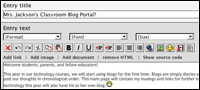
- Just below the welcome, you can choose to make your blog entry public to the world or just to your students.
You also can let anyone or just your students post comments about your blog. Start by choosing options for
both that make your blog accessible only to members; you can choose to make it public as you get more experience
with a blog.
- Click Publish.
Now, each day or week you want to add a new entry, just go to your Blog and click New Entry. (You might want
to bookmark your blog's URL --http://__________.21publish.com.) Note that you also can upload files (such as
a PowerPoint lecture) and add links to other sites here. Take a few minutes to click around and discover how
you can alter your main blog.
Next: Adding students.
|

