ADD STUDENTS
- Click Community and Members, and then click Manage.
- Type a username, password, and the first and last name for each student in your class.
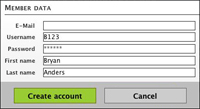
The username and password should be unique for each student. Depending on the age and maturity of your students, you can choose them or allow students to choose their own. (Because the site is private, you can use their first names for their user names.) Keep in mind that when students choose their own passwords, they tend to use something they like such as "SkiAspen" or "Soccer." Those are, not surprisingly, easy passwords for friends -- and enemies -- to hack, so assigning random passwords is a good idea. They'll, of course, need to write down their usernames and passwords.
Next: Creating student blogs.
|

