STEP THREE: ADD CONTENT TO THE PORTAL PAGE
- Click the Portal Content button, and then click More Options on the far right.
- Click Description and you'll the screen below.
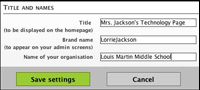
- Change the title to anything you want, and type the name of your school under Organization. Leave the Brand Name blank alone.
Next: Welcoming visitors.
|

