QUESTION FOUR
I want students' names to print on every page of the spreadsheet. Sometimes, I also want to print (or not
print) column letters and row numbers. How do I do that?
The problem with answer #3 (freezing panes) is that students' names will not print on each page of
the spreadsheet. To change that, you need to:
- Click Page > Print Set-up (or File > Page Set up > Sheet on a Mac).
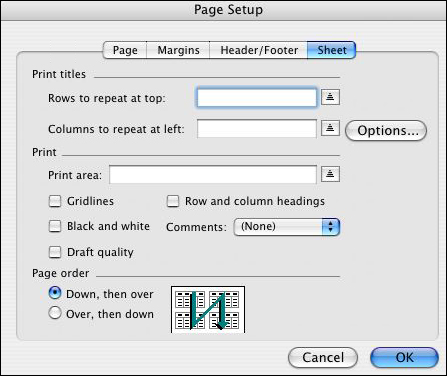
Notice the choices you have. You can print gridlines (those little cells on the spreadsheet don't show up
in print documents unless you tell them to!) and/or row/column headings (A1, B2...) In addition, the Print
titles area allows you to select a row/column to print at the top or left of each page. You might need to
play around with how to indicate which row/column you want, because it can be a bit tricky at first -- but
you'll get it!
- Make your choices and click OK.
Next: A forest of formulas.
|

