| A TECHTORIAL |
QUESTION FIVEI'm putting my grades on a spreadsheet, and I want the average grade on an assignment. How can I do that quickly? Formulas and functions can sound scary to teachers new to Excel, but learning just a few of them will make averaging -- and a few other class tasks -- a cinch.
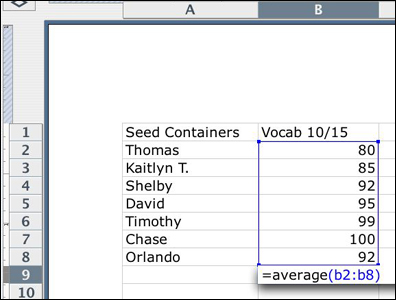
Look at the graphic below: =average(b2:b8) is a "formula." It also could have been written =(b2+b3+b4+b5+b6+b7+b8)/6 -- the way we learned to average in school! That also is a formula. The word average is "function." It tells Excel, "Hey, add up these cells and then divide by the total number of cells to get the average." Other Excel functions include max for maximum (What's the largest value among these cells?); min for minimum (What's the smallest value among these cells?); and sum to simply add up all cells. Try formulas and functions yourself sometime, and see how easy they can make your life! Next: Merging cells.
|