STEP
TWO: FILL IN THE BOARD
Note: This sample bingo review board will contain plant reproduction
terms for students in grades 3-5, but you can create a board for
any content area and/or grade level you choose. Words and definitions
for this board can be found in the Glossary
of the Great Plant Escape.
Type the word "annual" in cell A1 and hit Return. Then, type the words below in the cells indicated. Hit return after each word:
- cell A2: perennial
- A3: compost
- A4: endosperm
- A5: pistil
- B1: leaf
- B2: nitrogen
- B3: stem
- B4: tuber
- B5: style
- C1: seed
- C2: conifer
- C3: root
- C4: cones
- C5: filament
- D1: rhizome
- D2: bulb
- D3: stamen
- D4: flower
- D5: pollen
- E1: biennial
- E2: chlorophyll
- E3: ovary
- E4: simple leaf
- E5: fruit
Highlight cells A1 through E5 and click Format. Choose Arial for font style, 14 for font size, and center for alignment.
Now, let's name our game! Click Format>Insert Header and type "Plant Bingo!" Hit Return, and then type the name of your class (Mrs. Henderson's 4th Grade Class, for example).
Click Options>Display, uncheck Column Headings and Row Headings, and click
OK. Your bingo game is almost complete. It should look like this:
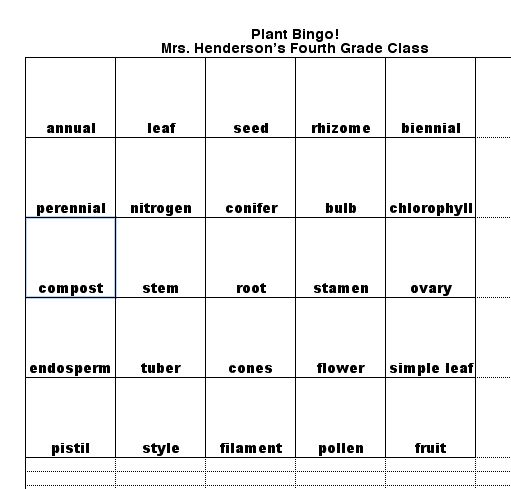
Save your work.
Next
:Adding the pieces.
|

