|
STEP
ONE: CREATE THE FIRST BOARD
Open AppleWorks.
Choose Spreadsheet in the Starting Points Pane to open a spreadsheet.
Click Window>Page View.
Highlight rows A1 to E5.
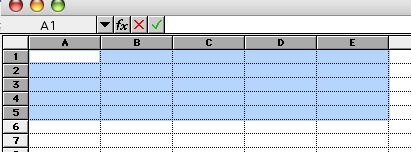 Click Format>Column Width, type 90, and click OK.
Click Format>Row Height, type 80, and click OK.
You now should see a 5x5-cell playing board on the top half of the page. Click the small mountain icon at the bottom left corner of the screen to see the whole page.
With cells A1 through E5 still highlighted, click Format>Borders and click Top, Bottom, Left, Right, and click OK.
Your board should look like this:
Click Format>Column Width, type 90, and click OK.
Click Format>Row Height, type 80, and click OK.
You now should see a 5x5-cell playing board on the top half of the page. Click the small mountain icon at the bottom left corner of the screen to see the whole page.
With cells A1 through E5 still highlighted, click Format>Borders and click Top, Bottom, Left, Right, and click OK.
Your board should look like this:
 Save your file. This sample file should be saved as PlantGrowth1.cwk, but no matter what topic you use, be sure to include the number 1 somewhere in the file name. You'll see why later.
|
|

