| A TECHTORIAL |
|
STEP TWO: INSIDE A PROGRAM
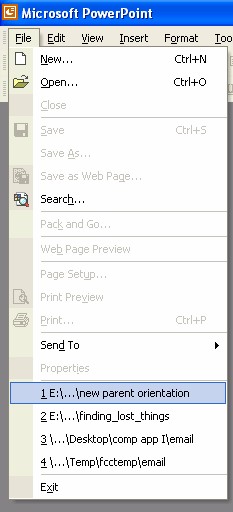
Still looking for your missing file? Click Start and then click All Programs. Open the program�Word, PowerPoint, Excel, ClarisWorks�in which the missing file was created. Click File in the menu bar at the top of the program window; a list of options will appear. (Note: You might have to click the pair of arrows at the bottom of the drop down menu to see the entire option list.) Beneath the list of options, you will find a list of the files created with that program that were opened most recently.
Did you find the missing file? If so, click the file name to open it, and then go to the end of this techtorial for some important advice! If you didn't find the file you were looking for, go on to Step 3. Next: Widen the search!
|