| A TECHTORIAL |
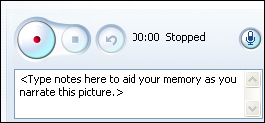
ADD NARRATIONHere�s where the fun begins: You can record your voice, a student�s voice, or the voices of your entire class for any photo in your project. Imagine an end-of-year show in which a student�s voice describes the field trip to a Fire Station as a picture of the class on a fire engine is displayed! Or hear a middle school student describe Costa Rica�s rain forests as a photo of indigenous birds is shown. To record narration, you�ll need a microphone. Most newer laptops come with an internal mic that will provide adequate recording capability. For classrooms with desktop computers, for multiple students recording at once, or for better quality, you might want to invest in an external mic. For $20 or less, you can find a basic mic at an electronics or office supply store. If possible, get a combination headphone/mic set (like what a telephone operator may wear). The headphones prevent the mic from picking up the whirring of the computer�s hard drive, while the mic is close to the speaker�s mouth, reducing ambient noise. Another great tip: Script your narration. Students and teachers alike will ramble or stammer if they record without notes. PhotoStory3 provides ample space for users to type their scripts before recording. To record, press the red button and speak clearly and slowly. Press the square button and hit preview to listen to the narration. To erase and re-record, press the button with the curved arrow and repeat the recording steps. Next: Name that tune.
|