QUESTION EIGHT
How do I sort student's grades to see who had the highest score on a test.
Simple!
- Highlight the data and any headings, and then click Data > Sort.
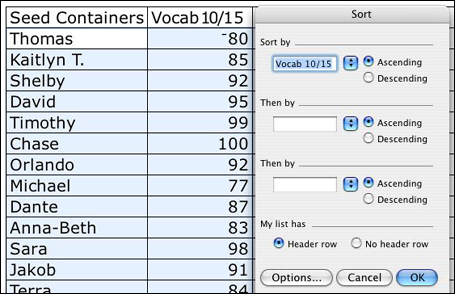
- Indicate in the Sort by blank the data you want to sort. Be sure to sort data by the correct heading -- Vocab test 10/15, in this case -- and not last week's Lit test.)
- To see scores from highest to lowest, click Descending and then click OK.
- Be sure to click "Header row" if your chart has one, or Excel will sort headers along with data.
- If you make a mistake, click Edit > Undo to try again.
Next: Adding/deleting columns and rows.
|

