OUTLINE THE IMAGE
This is the fun part! We're going to trace the outline and details of the butterfly!
- Click View > Toolbars > Drawing.
- Click the Lines icon, and then select scribble.
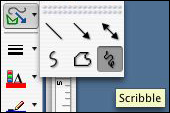
- Draw a line around the outside of the butterfly, and then add details. Note that the scribble tool works best if you keep drawing, and don't stop and start.
- You can use the circle shape, thicker lines, even colors to enhance your tracing!
- Now, you might want to change the color of the line to pink or something more vibrant, so it stands out and you can see what you've done.
- If you successfully connected your line without a break, the image might disappear behind white ink. Click the paint can icon and select No Fill.
- Delete messy lines.
- When you're done, click the butterfly image once and hit Delete.
- Did you get every detail you wanted? If not, click Edit > Undo and fill in missing details.
Next: And the result is...
|

