STEP THREE: ANIMATE!
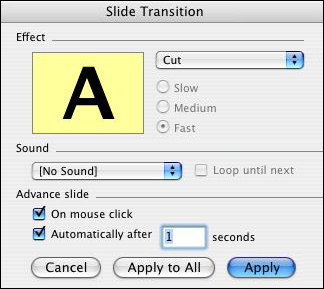
- With PowerPoint still open, click Slide Show > Slide Transition.
- Select "Cut" and No Sound; click "Automatically after __ seconds;" and type "1" in the box. Click Apply
to All.
That's it. Want to see? Click Slide Show > View Show. You should see each page flip to the next page in one
second, and your pig should slowly smile. Unfortunately, timing cannot be shorter than one second in PowerPoint,
but other programs might allow you to shorten the time even more.
- Save your work.
Wow! Wasn't that easy? Remember, you can replicate those steps in a variety of other programs. Contact the author if you need help completing this techtorial using another software program.
Next: Tips and tricks.
|

