|
STEP TWO: CREATE THE TESSELLATION
Have students follow the steps below to create their tessellation.
- Click View>Zoom, select 150 percent (or greater) and click OK.
- Press CTRL D (Mac: Apple/Command Key and D) to duplicate the
chevron. (That both copies and pastes in only one step.)
- Duplicate the chevron 15 times.
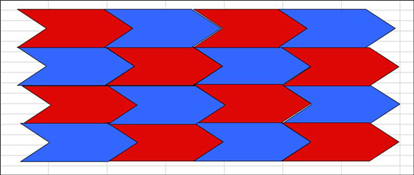
- Arrange the chevrons in a pattern so they are end-to-end and
row-upon-row, with no spaces in between. (There should be four
chevrons on each of four rows.)
- Use the paint can icon on the Drawing toolbar to color the polygons.
(Alternate two colors for best effect.) Hint: Hold down the shift
key while selecting every other polygon, and then click a color
to quickly paint half the polygons.
- The complete tessellation will look something like this:
- Save your work!
Next: Creating a tessellation
with an original polygon.
|

