|
SIMPLIFYING BY MAGNIFYING
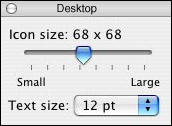
Are your students getting to the wrong file because they're having a hard time seeing details on the icons? Younger students especially might need bigger icons, so let's increase the icon size on the desktop.
If you're working on a Mac:
- Click on the desktop, and then click View>Show View Options
on the menu bar.
- See the toggle bar? Move the bar closer to large to increase
the icons to whatever sizes you'd like.
If you're working on a PC:
- Click Start>Control Panel. (Make sure you're in Classic View.
If not, click Switch to Classic View in left pane.)
- Click Display>Appearances>Effects.
- Click Use Large Icons, and then click OK twice.
- Close the Control Panel.
Next: Simplify by combining.
|

