TIPS FOR PRESENTING YOUR SLIDE SHOW
Copyright, copyright,
copyright: Be sure to check your district or school policy for using
copyrighted materials before adding pictures taken by portrait studios,
yearbook photos taken by non-school photographers, or music written
or performed by someone other than yourself or your students. If
copyright issues have not been addressed by your school, start the
discussion with the Copyright Quiz or Two-Page Copyright Chart;
both are free Copyright
Resources available from Hall Davidson, a leading expert on
the topic.
Be aware that custom
animations and animation schemes (fancy ways of moving text, graphics,
and slides) sometimes can interfere with music, especially when
you want the music to keep playing over a number of slides.
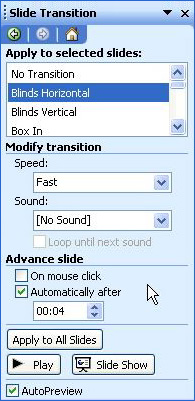
The smoothest way to
transition from slide to slide in a photo show is to make sure each
slide transition (Format>Slide Transition) is set to move automatically
to the next slide after 3-5 seconds. That way, you don't have to
click through the show using the mouse.
Before presenting the show to an
audience, be sure to preview it several times to make sure the music
lasts all the way through to the final slide.
Hint: The easiest
way to use music is to play a CD from beginning to end.
Next
: Tell me more.
|

