MAC OPTIONS
On a Mac, Slide Template
or Slide Design (a preset background) usually is used for slide
shows. In a photo slide show, because many photos will not take
up the entire slide, slides might look too busy if they're created
on a complex background. Some options:
Use Slide Template only
for the title and final slides. Click Slide 1, go to Format>Slide
Design and click a template or design you like. Make sure the "Apply
to all slides button" is not clicked, and then click OK. Repeat
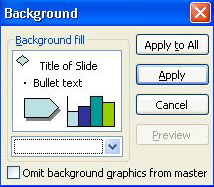
the step for the final slide. For all other slides, click Format>Background
and choose a solid or blended color that is compatible to your template
or design, but still fairly simple. You'll need to repeat that step
for every photo slide.
Use a solid or blended
color as the background for every slide. Click Format>Background,
choose your colors, and then click Apply to All.
Next
: Sizing photos.
|

