STEP ONE: GET STARTED
First create a spreadsheet:
- Open AppleWorks and
click the Spreadsheet icon at Starting Points.
- Change the Page Layout
to Landscape: Click File>Page Setup; click the middle icon beside
Orientation; and click OK.
- Click cell A1 and
type "Pets."
- Click cell B1 and
type "Number."
- Click cell A2 and
type "Dogs."
- Click cell A3 and
type "Cats."
- Click cell A4 and
type "Fish."
- Click cell A5 and
type "Snakes."
- Click cell A6 and
type "Birds."
- Click cell A7 and
type "Turtles."
- Click cell A8 and
type "Hamsters."
- Click cell A9 and
type "Other."
- Save your work.
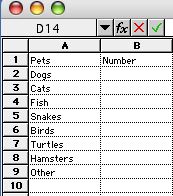
Your screen should look
like this:
Next: Add the graph.
|

