STEP ONE: CREATE THE MASTER SLIDE SHOW
Create a frame for your
presentation with a beginning and ending slide.
- Open PowerPoint. Choose
the Title Slide template. This will be the first slide in your
presentation.
- Type the name of the
event in the title box.
- Type your name, class,
school, and date in the subtitle box.
- Click Insert>New Slide.
Choose a slide layout that allows you to include a title and graphic
or text and graphic. This will be the last slide of the presentation.
- Type "Thanks for Coming!"
in the title or text box.
- Insert a clip art
image into the graphic box - an image of a man bowing, for example.
- Click Format>Slide
Design (or Apply Design Template) and choose a slide design --
"Curtain Call," for example.
- Save your work.
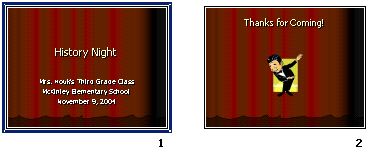
This is what the slides
might look like:
Next: Creating prompts.
|

