|
MORE ACTION BUTTONS
Repeat the previous steps for the two "That's Right!" slides, except when the Action Settings window opens, click the down arrow next to the Previous Slide option and select Slide.
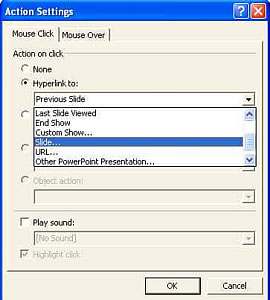
Then:
- If students have reached the first "That's Right!" slide, they've answered the "How many dogs do you see?" question correctly and are ready to move to the next question. Select the "How many monkeys do you see?" slide and click OK.
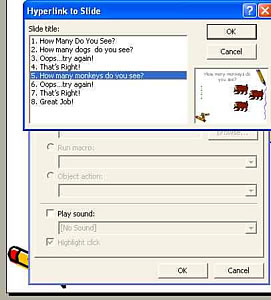
- If students have reached the second "That's Right!" slide, they've answered the "How many monkeys do you see?" question correctly. Select the "Great Job!" slide and click OK.
Save your work. Then test your work by viewing the show, clicking all the answers, and using the action buttons on each slide!
Next: Learn more!
|

