|
PUTTING IT ALL TOGETHER
Now, take a look at how the math activity should work. Double-click Slide 2 to see it in Normal view. Four dogs are on the slide, so "4" is the correct answer to the question "How many dogs do you see?" If a student clicks "4," therefore, he or she should move to the "That's Right!" slide. The "3," "5," and "6" are incorrect answers. If a student clicks "3," "5," or "6," he or she should go to the "Oops...try again!" slide.
You need to add hyperlinks to take students to the appropriate slide. Here's how:
- Highlight answer "3," and go to Insert>Hyperlink on the menu bar at the top of the page.
- Click Place in this Document. A list of all the slides you've created will appear.
- Answer "3" is incorrect, so click the slide title "Oops...!" immediately after the slide titled "How many dogs do you see?"
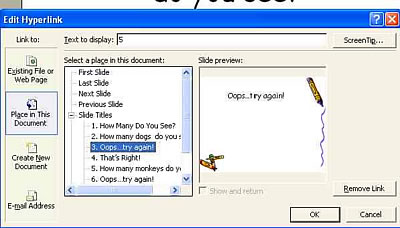
- Repeat the steps above for answers "5" and "6" on Slide 2.
- Repeat the steps above for answer "4," but this time, link to the slide titled "That's Right!" immediately after the first "Oops...!" slide.
- Go to the slide titled "How many monkeys do you see?" and link answers "1," "2," and "4" to the second "Oops�!" slide.
- Link answer "3" to the second "That's Right!" slide.
- Save your work.
Next: Action!
|

