WORD WONDER # 1 SAVE TIME WITH TYPING SHORTCUTS
Problem:
Frequently used
school names, addresses, names of units and programs, and long phrases,
can be tedious and time consuming to type.
Solution:
Save time and your fingertips! Use AutoCorrect to create shortcuts
for frequently typed phrases.
Classroom
Application: Use shortcuts for parent letters, lesson
plans, and any other documents in which you have to type the same
text over and over again. Once a shortcut has been created, it will
work in all Office programs (such as PowerPoint and Excel). Teach
students to create and use shortcuts to speed up their report writing
-- or to make secret code games.
Directions:
- Click Tools>AutoCorrect
Options (or just AutoCorrect on a Mac).
- Click the box next
to Replace text as you type.
- In the Replace: box,
type the shortcut you want to use, for example, SF.
- In the With: box,
type the longer phrase you want the computer to replace the shortcut
with, for example, Central High School's Annual Science Fair.
- Click Add.
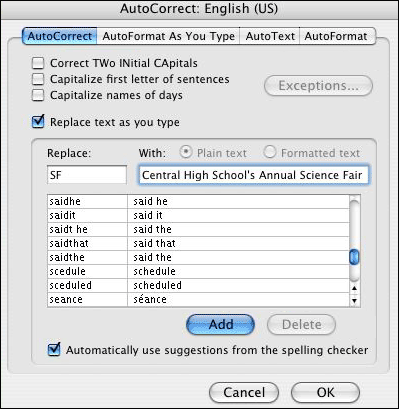
- Enter as many additional
shortcuts as you wish. Click Add after entering each shortcut.
- Click OK to save all
shortcuts. Now, whenever you need to type the longer phrase, such
as Central High School's Annual Science Fair, type the shortcut
SF instead. Word will replace the shortcut with the longer phrase.
Next:
Next: Creating Shortcuts..
|

