|
LEARN THE CODE
To create their own "Five Minute Web Page," have students
- Go to Start>All Programs>Accessories>Notepad. (Be sure students are working in Notepad and not in a word processing program.)
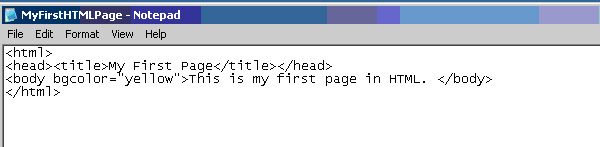
- Type < html > and then hit ENTER.
- Type <head><title>My First Page</title></head> and then hit ENTER.
- Type <body bgcolor="yellow">This is my first page in HTML.</body> and then hit ENTER.
- Type </html> and then hit ENTER.
- Go to File > Save As.
- Choose All Files in the box next to Save as Type.
- Type MyFirstHTMLPage.html in the box next to File Name.
- Save this file to the Desktop or My Documents. Hit OK.
Your students' files should look like this:
Have students close or minimize the Notepad window.
Next: See what you've done!
|

