CONVERT TO MP3 FILES
To convert Audacity recording to a mp3 file
- Open Audacity.
- Open the file you want to convert.
- Click File>Convert to mp3.
- Click OK (when a window/pane pops up and asks if you want to find Lame).
- Browse to Desktop or My Documents; click LameLib; and click OK.
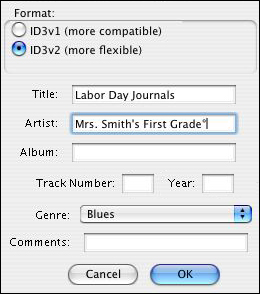
- When a new window/pane pops up and asks for details about your recording, fill in a title (what the recording was) and artist (who recorded it), and then click OK.
It will take a few minutes to convert your file. Then, you�re done!
To share the file,
- Attach the mp3 file to an e-mail and e-mail it to parents or students.
- Post the mp3 file on the school or class web site.
- Burn the mp3 file onto a CD.
When a student or parent gets to your file (either by saving an e-mail attachment or seeing the file online), they can double-click it and Windows Media Player or iTunes will play the file. Simple!
That�s it�you�ve recorded, edited, and shared sound in three easy steps!
Next: Learn more!
|

