ADD A FEED
Now that you've found a site whose feed you want to receive, what's next? Let's find out.
- Go to David Warlick's Two Cents Worth blog. (Warlick is a leading educational technologist whose blog, an online journal, is frequently updated. So, if you want the latest informed opinion on technology in the classroom, this is a not-to-be-missed site.)
- Scroll down the page. Where's the orange XML, RDF, or RSS icon? Click the name David Warlick on the right under Webs to go to his home page. There, under the two pennies, you'll find the RSS icon.

- Right-click (CTRL click on Macs) the icon and select "Copy Link" or "Copy Link Location".
- Go back to your NewsGator account, click Add Feeds, and then click URL & Import.

- Paste the copied link into the Feed URL blank and click Add Feed. You'll now see your NewsGator feeds again, with David Warlick's feed at the top. Click to see the latest headlines.
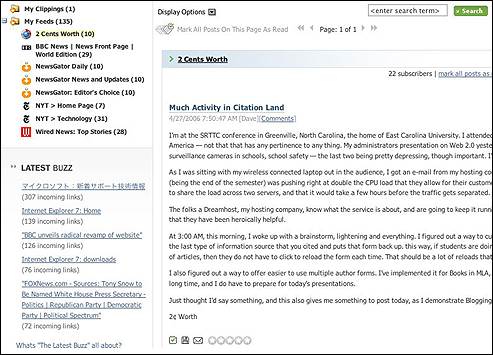
You'll notice that instead of an article summary, you see the entire blog entry. That's an option some Webmasters use.
So, you've subscribed to a reader, found a new feed, and added it to your list. That's it! Now, once a day (or once an hour or�), return to NewsGator and see what's new from your feeds! Don't forget to weed out feeds you don't check regularly! Keep it simple and easy to find what you need.
Next: Using feeds in K-12 classrooms.
|

