| A TECHTORIAL |
LOCATE IMAGES
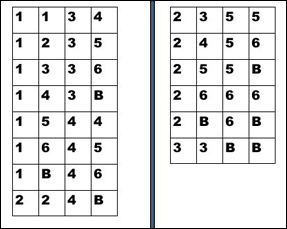
Remember the instruction to number your images or words? The apple wedge is image #1 in our example. Use the diagram below to find out where to place each apple wedge. Place a wedge in each cell marked "1." Now, repeat steps 1-6 on the previous slide to copy, paste, change the layout to tight, and duplicate the image seven times. Then move each image to the appropriate cell, as indicated on the diagram above. For our example, here's where to place each image:
Save your work! Next: The finished product.
|