STEP ONE: CREATING SYMBOLS
This techtorial is intended to be used by elementary-level
students working independently or in pairs.
Provide students with the following directions:
- Double-click the icon below to open Inspiration.

- A new page will open up with a green bubble, called a "symbol."

- Using the keyboard, type your first name. Your name will replace
the words "Main Idea" in the green bubble.
- Click to the bottom-left of your name. A new bubble will appear.
Type the words "I love to eat ______________" and the name of
your favorite food in that bubble.
- Click to the bottom-right of your name and type "I love to
read about ___________" and a description of what you like to
read about in the new bubble.
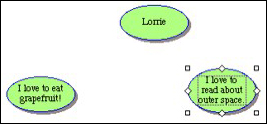
- Your page should look like something like this:
Next: Linking your
symbols.
|

