| A TECHTORIAL |
|
WHAT’S A TABLE?
A table is simply an arrangement of columns and rows. You can use tables to easily create a holiday worksheet.
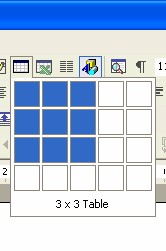
To add a table to your Word document, click the Table icon in the toolbar at the top of the Word window.
Drag the mouse across and down the table to highlight the number of rows and columns you want in your worksheet table. (Don’t click the mouse button.)
When the number of columns and rows you want are highlighted, click the table to insert it into your document. Or click Table in the toolbar at the top of the Word window and select options from the drop down menu to create and insert a table. Insert clip art, photographs, or text into your table by clicking in a cell or row and then following the same steps you would to insert text, clip art, or photos into any other part of the Word document. Next: Adding a background.
|