|
DOING THE GROUNDWORK
To create a simple track, click Make a New Track and complete the online form. The following tips can help you complete that form.
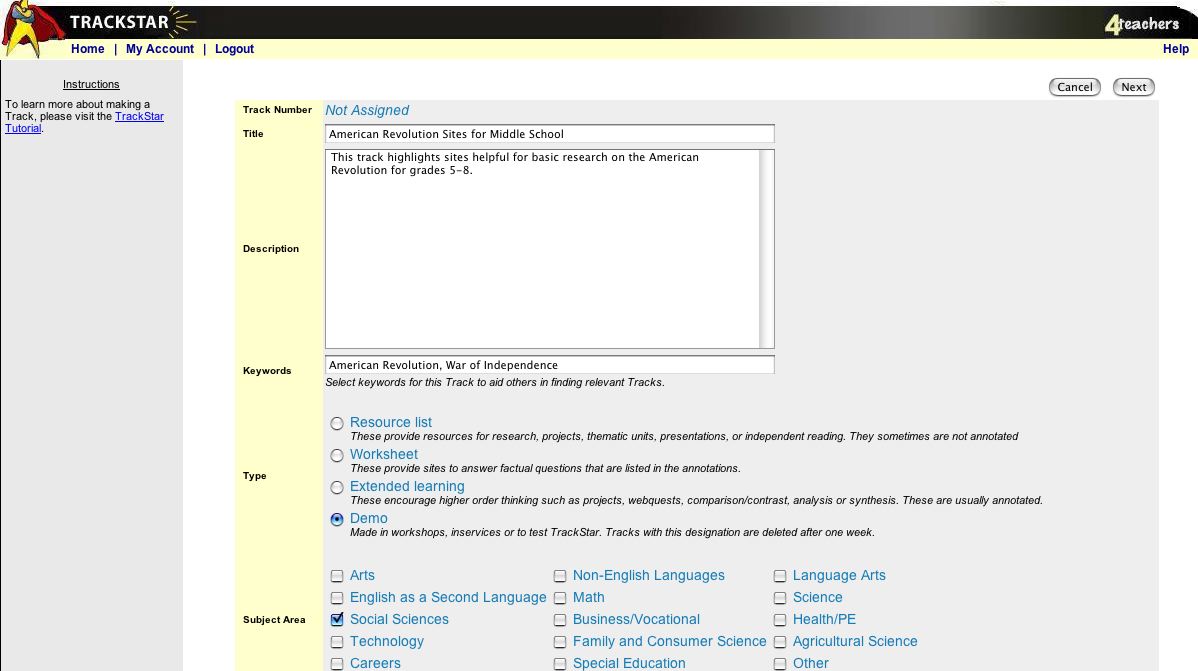
- Type in the Title box: American Revolution Sites for Middle School
- Type in the Brief Description box: This track highlights sites helpful for grades 5-8 to conduct basic research on the American Revolution. (If you're using your own topic, remember that other teachers and students will see your track, so make the description as specific as possible to help them decide if your track meets their needs.)
- Add keywords that relate to your topic and might help other teachers or students find your track. For this example, type: American Revolution, War of Independence
- Click Demo under type, unless you have your own topic and want to create a permanent track. Then, click either Resource List or Worksheet.
- Choose a subject area and grade level. If your track is cross disciplinary or can be used with more than one age group, be sure to check all applicable areas or grade levels.
- You can choose to keep your track online until a certain date (great for review purposes) and/or to password protect it.
- Your screen should look something like this:
Next: Add some sites!
|

