| A TECHTORIAL |
TIP 1: REMEMBER YOUR ABC'S
A = Antivirus Note to Mac users: No longer are Macs ignored by those who create malicious programs. A few Mac-specific viruses and worms are out there. More importantly, you can inadvertently spread PC viruses that attach themselves to your e-mail. So, help protect others and yourself by running antivirus software as well.B = Back-Up Are all your important school-related documents, photos, or other files safely stored in at least two different locations? Power surges, lightning strikes, theft, and mechanical breakdowns can cause files saved on your computer's hard drive to disappear or become damaged. Save important files to one other location -- such as USB drives (also called jump drives or memory sticks), CDs, the school server, or e-mail attachments sent to another computer.
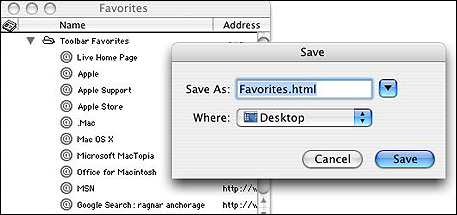
While you're at it, be sure to back up your browser's bookmarks or favorites. Otherwise, when your computer dies, all the links you've been saving are gone as well. The process for backing up those varies, depending on your platform and program. In Internet Explorer for Mac, for example, click Window>Favorites to open the Favorites Window; click File>Export Favorites; and then click Save. That will save a file called Favorites.html to your Desktop. You can rename the file and save it wherever you want; just be sure to back it up with your other files!
C = Clean-Up As long as we're talking about cleaning up, what's on your computer's desktop? You'll hate coming into school in August to find a jumbled mess on your computer screen, so take the time now to do some spring cleaning. Make sure all the files you want to keep are in clearly labeled folders. Delete any unneeded or duplicate files. Empty your recycle bin. Next: Safety matters.
|