FILE MANAGEMENT
Many computer users save files on their desktops. After a while, the desktop becomes messy and files become difficult to find. Unclutter your desktop by creating folders for all those loose files:
- Right-click any empty area on your desktop.
- Click New>Folder. A new folder will appear on the desktop.
- Type a name for the folder and hit Enter.
- Drag any files you choose into the new folder.
You also can create folders within folders. Just open a folder and follow the steps above to create a subfolder.
How can you make it easy to find documents in a crowded folder?
- Double-click to open the folder.
- Click View, and select List or Details to make an orderly and
compact list of the files in that folder.
- Click View, and select Thumbnails to see small versions of pictures
or clip art.
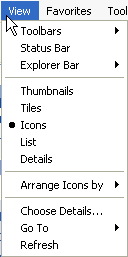
Hint: When looking in a folder for a file you've forgotten the name of, click View, select Detail, and click Date Modified to organize files by the date they were most recently worked on. Then, scroll to find those files opened or changed near the date you think you last opened the missing file.
Next: Learn more!
|

