|
FLAGS - EXCEL STYLE
Students in grades 2-5 will enjoy this colorful Excel activity.
Explain to students that they are going to create flags using geometric shapes. Some students might be familiar with the house flags used in the Harry Potter series. Tell them these will be their own house flags. Tell students that to make their flags, they will:
- Go to Start>Programs and click Microsoft Excel.
- Click AutoShapes>Basic Shapes in the drawing toolbar at the
bottom of the screen. Note: If students don't see the AutoShapes
menu, have them go to View>Toolbars and click Drawing to display
the drawing toolbar. They'll find the AutoShapes menu to the right
of the word Draw.
- Click a shape in the menu.
- Click the open Excel document.
- Drag the mouse around the page to create the shape.
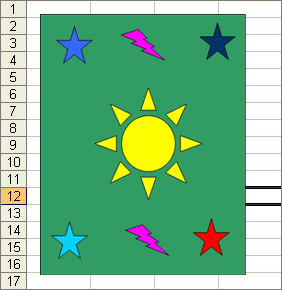
- Use the paint can or paint brush in the drawing toolbar to add
color to their pictures. Note: They also can use those tools to
add gradient colors, textures, patterns, and so on.
- Use WordArt to create a title for their drawings. To access
WordArt, click the angled A in the drawing toolbar.
To print a drawing, highlight it (Be sure to highlight the entire
drawing), and then click File>Print Area>Set Print Area>OK.
Next: Learn More
|

