|
SORT DATA
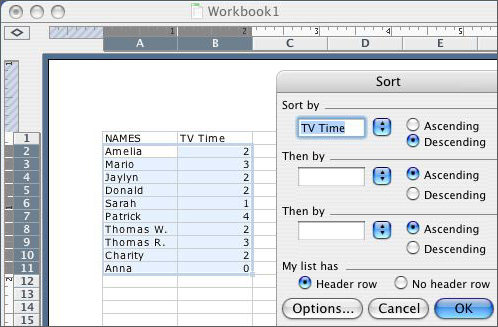
Explain to students that sometimes it is necessary to arrange numerical data in a particular order -- from highest to lowest or fewest to most, for example. Tell students that they are going to arrange their TV viewing times in order, from the most hours of viewing time to the fewest hours. To do that, they
- Click cell A2, hold down the mouse button, and drag the cursor
down and to the right to highlight all the cells with text in
them in column A and column B.
- Go to Data>Sort in the menu bar.
- In the first drop-down menu, select TV Time (or Column B).
- Select Descending.
- Click OK.
- Notice that now the student(s) who watch the most TV are first
and the students who watch the least TV are at the bottom of the
spreadsheet.
- Save your work.
Next: Create a border!
|

