|
FILL IN THE BLANK QUESTION
First, we'll create a fill-in-the-blank question. Here's how!
- Type the following text into your new document: 1. is the capital of Florida.
- Place your cursor before the word "is" in the sentence.
- Click the ab| button (called the Text Form Field) on the Forms toolbar. A gray rectangle will appear.
- Double-click the gray rectangle to open the Text Form Field Options window.
- In the Text Form Field Options window, click the drop-down menu beneath Type to choose the type of information that will be entered. Select "regular text."
- In the Text Form Field Options window, beneath Default text, you can type a prompt for the test-taker (for example, "Type your answer here"), or you can leave the area blank.
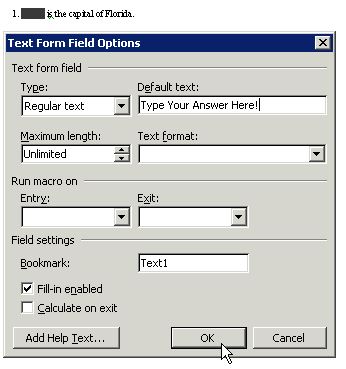
- Click OK to close the window.
- Hit the space bar to add a space or spaces between the gray rectangle and the rest of the sentence.
- Place your cursor at the end of the sentence and hit Enter.
Next: Create a multiple-choice question.
|

