|
HELP! MY KEYBOARD'S GONE KRAZY!
Are you typing one thing and getting something different -- or nothing at all? First, make sure the keyboard is connected to the computer. Then
- If everything you type is capitalized, even though the CAPS Lock is not on ... Find the NUM lock on your PC keyboard (above the number keys on the right side of the keyboard.) If that's on, turn it off.
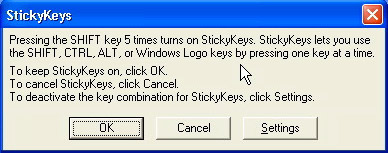
- If odd things appear or open when you try to type, you might have enabled Sticky Keys or another accessibility feature without knowing it. Hit SHIFT five times to disable Sticky Keys, or restart the computer.
- Turn off the computer, flip the keyboard over, and tap it gently against a desk or table. Food or other debris might be lodged under a key.
- Use a can of compressed air (found at any office supply store) to thoroughly clean the keyboard.
- Swap keyboards to see if the problem is with the keyboard or with the computer.
Next: My computer is dead!
|

