A    T E C H T O R I A L

WORD WONDER # 7

TRANSLATION HELP WITH TABLES

Problem: Formatting passages to be translated for a foreign language class can be tricky. Helping students understand the difference between literal and figurative meanings, or between such concepts as summarizing and paraphrasing, also can be challenging.

Solution: Use the Text to Table feature to improve translation and interpretation skills.

Classroom Application: Use this feature with middle and high school students in language arts, English, or foreign language classrooms, and with students whose English proficiency is limited.

Directions:

  • Type the passage to be interpreted. End each sentence or phrase with a comma. Hit Enter at the end of each line. (The passage should look like a poem.)
  • Highlight the passage typed.
  • Click Table.
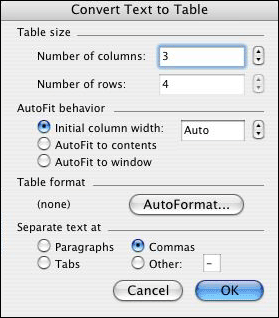
  • Select Convert and select Text to Table.
  • Click the box next to Commas.
  • In Number of columns, select or type 3.
  • Click OK.


    The passage should now be in the first column of a three-column table. Students can type the literal meaning of each foreign language phrase in the cell to the immediate right of the phrase and the figurative meaning of each foreign language phrase in the cell to the far right of the phrase.

Next: Learn more.

 
Close window